

Documentation menu
Getting started
Dashboard & analytics
- Dashboard at a glance
- Cost analysis
- Pipeline performance
- Optimization insights
- Knowledge Base
- Connect your AI agent
Managed runners
- Runners overview
- Run your first job
- Migrate from GitHub-hosted
- The Runners page
- Custom runners (AI Scan)
- Self-healing
- Runner image & software
- Provisioning & warm pools
- Limits & concurrency
Caching
Team & notifications
Billing & plans
Help
Self-healing: what it does
How Latchkey runners detect and fix transient CI failures during the run, what they will never touch, and how heal proposals become reviewable pull requests.
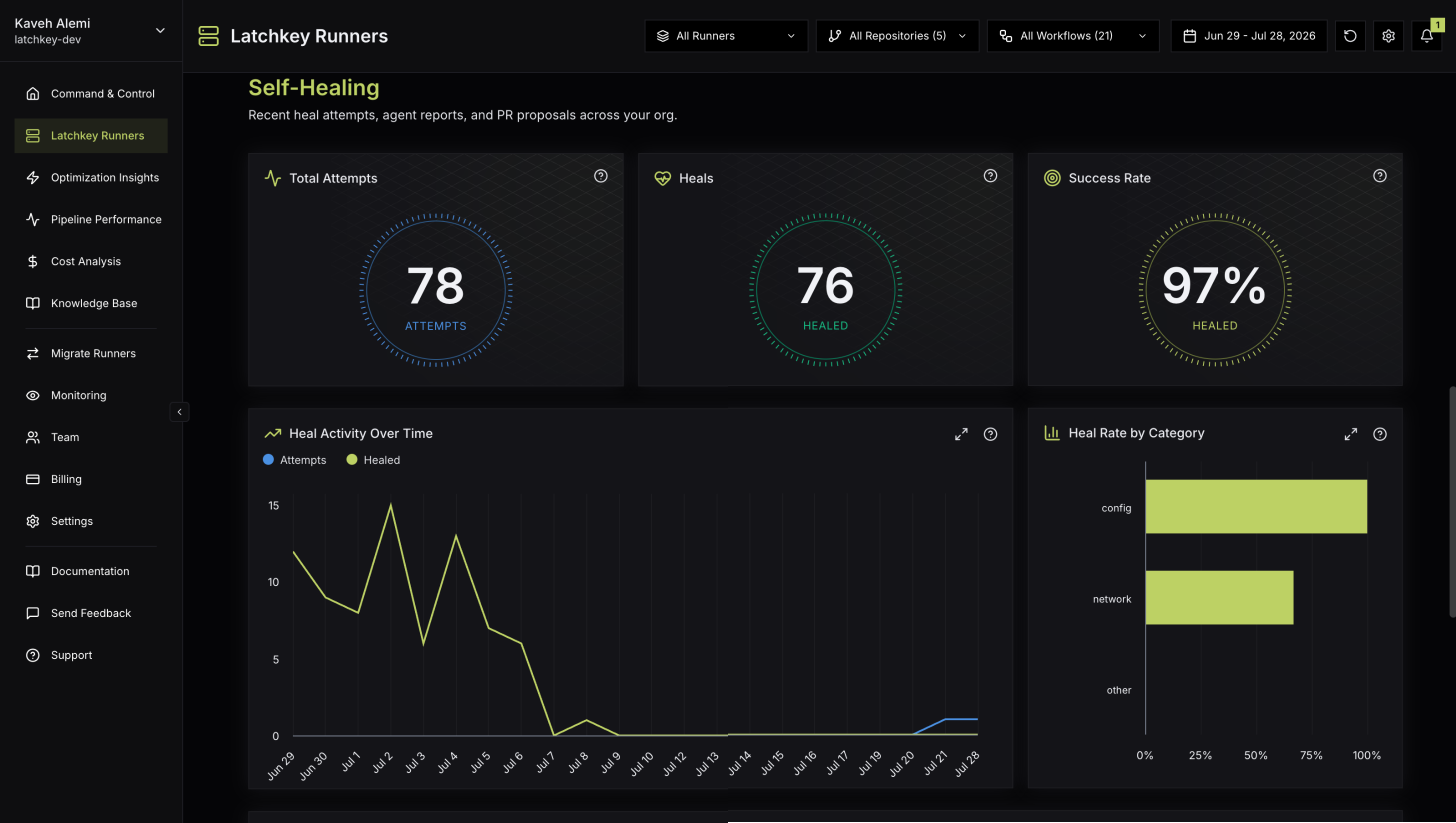
Every Latchkey runner ships with self-healing built in, enabled by default. When a workflow step fails, the runner diagnoses the failure locally and, when it is a known transient class, fixes it and retries the step in place. Your build goes green without a human re-run, and every intervention is recorded for you to inspect.
The three-stage diagnosis cascade#
Diagnosis runs fastest-first, so the common cases cost almost nothing:
Exit-code lookup (instant)
Some failures identify themselves. Exit 137, the kernel killing a process that ran out of memory, is decided and fixed right at this stage. Exit 127 (command not found) is flagged here too, but its actual fix comes from stage 2's pattern library and install allowlist.
Pattern library (deterministic)
The step output is matched against a curated library of known failure signatures: registry timeouts and 5xx responses across npm, yarn, pnpm, pip, uv, Go modules, cargo, NuGet, Docker and GitHub registries, Composer, Bundler, Maven, apt, and git; DNS and TLS hiccups; rate limits; heap exhaustion; disk-full errors; lockfile drift. A pattern match is deterministic: same failure, same fix, every time.
Bounded AI diagnosis (novel failures)
Anything the first two stages do not recognize goes to a sandboxed AI agent with a strict time budget (about four minutes). It reads the captured output, reasons about the root cause, and either applies a safe in-runner fix, proposes a durable fix as a pull request, or concludes the failure is real and lets it stand.
What it catches, by category#
The biggest source of flaky CI: package registries and external services having a bad moment. Timeouts, 5xx responses, DNS resolution failures, TLS handshake errors, and rate limits across every major ecosystem. The fix is a retry with exponential backoff; the walkthrough below shows this exact case end to end.
npm ERR! code ETIMEDOUT
npm ERR! network request to https://registry.npmjs.org/react failed
npm ERR! network This is a problem related to network connectivity.
Out-of-memory kills (exit 137) and language-runtime heap exhaustion. The fix raises the limit for the retry via environment variables such as NODE_OPTIONS=--max-old-space-size=6144, _JAVA_OPTIONS=-Xmx4g, and their GRADLE_OPTS equivalents.
FATAL ERROR: Reached heap limit Allocation failed - JavaScript heap out of memoryENOSPC and disk-full failures. The fix frees space by pruning Docker layers and npm, pip, yarn, Gradle, and cargo caches plus /tmp, then retries the step.
Error: ENOSPC: no space left on device, writeA step assumes a tool that the job never installed (exit 127, "command not found"). The fix installs the missing system package from a vetted allowlist (the same package set found on GitHub-hosted runner images) and retries; tools outside the allowlist are deliberately left alone.
/usr/bin/bash: line 1: ffmpeg: command not foundKnown config mismatches with known-safe rewrites, such as a lockfile out of sync with the manifest, where npm ci fails but npm install is the documented remediation.
npm ERR! `npm ci` can only install packages when your package.json and
package-lock.json are in sync.The fix toolbox#
Every fix is applied inside the ephemeral runner only, and the runner is destroyed after the job:
A heal, end to end#
Here is one real heal, an npm registry timeout, from failing step to green job. Your step output streams unchanged, in real time; during a heal the runner adds two diagnostic lines of its own while the on-runner heal service is consulted:
$ npm ci
npm ERR! code ETIMEDOUT
npm ERR! syscall connect
npm ERR! network request to https://registry.npmjs.org/lodash failed, reason: connect ETIMEDOUT 104.16.92.83:443
npm ERR! network This is a problem related to network connectivity.
[latchkey-bash-wrapper] BEGIN sidecar POST (boot_wait=30s max_time=260s url=http://localhost/diagnose socket=/run/latchkey-self-heal/sock)
[latchkey-bash-wrapper] END sidecar POST ok (attempts=1 http=200)
$ npm ci
added 1291 packages, and audited 1292 packages in 42s
found 0 vulnerabilities- The step fails.
npm ciexits non-zero after npm exhausts its own internal retries. The runner captured the step output as it streamed, so the diagnosis starts with the full picture already in hand. - Stage 1, exit code. Exit 1 is not decisive on its own, so the cascade moves on.
- Stage 2, pattern match. The
ETIMEDOUTlines match a known npm network signature in the pattern library: verdict heal, category network, no AI involved. The two[latchkey-bash-wrapper]lines are the only trace of this consultation in your logs. - Retry with backoff. The plan allows up to 3 attempts with an escalating delay starting at 2 seconds. The runner waits, then re-runs the step on the same machine, in the same workspace: the second
npm ciin the log is that retry. - Green. The retry passes and the job continues as if the timeout never happened. On success nothing more is added to your logs; heals that change the machine announce it (for example
[latchkey-bash-wrapper] installed package: ffmpeg), so no intervention is invisible.
The narrative you did not see in the logs is on the dashboard: the Recent Heals feed on the Runners page shows a Healed row in the network category with a Pattern match pill and the action taken ("Retried the npm command with exponential backoff after a network timeout"), the Heal Details drawer carries the stage-by-stage story, and the run keeps a green Healed badge in Pipeline Performance.
Heal pull requests#
Some root causes deserve a durable fix in your repository, not just an in-run rescue: a setup step missing from the workflow, a missing engines pin in package.json, a too-low job timeout. When a successful heal traces back to a structural cause like these, self-healing produces a structured proposal and opens a heal PR with a typed, deterministic edit.
- Each PR is titled "Latchkey heal: <error summary>"; the body explains the Error, the Root cause, and the Fix, and links back to the workflow run, so review takes minutes.
- Proposal PRs carry a verification note: Verified by run when the PR's own workflow run passed, or Proposed fix, not verified by a passing run when it did not.
- When retries rescued the failing runs, the proposal quantifies it ("Latchkey auto-retried this workflow N times; M passed on the retry"); auto-retries pause when a workflow's retry pass rate is poor.
- Heal PRs are never auto-merged, and pull requests from forks are never touched.
- PR creation uses the GitHub App's permissions; if you never merge a heal PR, nothing in your repository changes.
Declined fixes: stop proposing#
Not every proposal class is welcome on every repository. Self-heal proposal findings on the AI Insight page carry a Stop proposing action (owners and admins): Latchkey then permanently stops opening PRs for that failure class on that repository until you undo it under Settings, Self-Healing, Declined fixes. Self-healing still runs on those failures; it just stops proposing workflow changes.
What it will and will never do#
Self-healing does
- Retry failed steps with backoff, on the same runner
- Raise memory limits and free disk space for the run
- Install allowlisted missing system packages
- Propose durable fixes as reviewable pull requests
Self-healing never
- Modifies your code or repository during a run
- Merges anything: repo changes only arrive as PRs you review
- Hides real failures: unhealable steps fail with original logs
- Touches pull requests from forks
Hand off to your coding agent#
Self-healing fixes the environment, never your source. When the real problem is a bug in your own code, the build fails truthfully, and the failure arrives as a complete, structured bundle served over the Latchkey MCP server, ready for your own coding agent to fix from. The bundle hands your agent what it would otherwise reconstruct by hand:
- The root cause, in plain language.
- The failing step's exit code and the exact source file where the error surfaced.
- The full, untruncated logs of the failing step, including output GitHub hides in its log viewer, with secrets stripped before they leave Latchkey.
- What self-healing already investigated and why it stood down, plus the workflow definition.
In Claude Code, the built-in /mcp__latchkey__fix command does the whole round trip in one step: it grabs the most recent unfixed failure and gets to work. Any MCP-capable agent (Cursor, Codex, and others) can read the same bundles through the server's tools. Setup, API keys, and the ready-made connect command are in Connect your AI agent.
Observability: every heal is on the record#
- Recent Heals (on the Runners page) lists every intervention with its category, verdict, and a plain-language description of the action taken; AI-diagnosed heals include the agent's reasoning iterations.
- Healed runs are flagged in the Pipeline Performance runs table and deep-link to their heal report.
- Heal KPIs and trends on the Runners page show how often healing saves a run and which categories dominate, which is itself a signal about your infrastructure.
| Signal | What it tells you |
|---|---|
| Outcome badge | Healed (the fix succeeded), No Action (the system intentionally did not act, such as on a failure in your own code), Failed (a fix was attempted but did not recover the step), or Pending (outcome not yet recorded). |
| Fix-type pill | How the heal was decided: Auto-fix (a deterministic exit-code rule), Pattern match (a known failure signature with a known fix), or Agent fix (the agent investigated). |
| Agent transcript | The step-by-step record of an agent heal: the plan, per-turn hypothesis and reasoning, each action and its result, and durations. |
Controls#
- Workspace-level switch in Settings, Self-Healing (owners and admins), on by default for new workspaces; changes take effect within about a minute.
- There is no per-repository toggle; the workspace switch applies to all monitored repositories.
- Declined fixes, also under Settings, Self-Healing, lists the proposal classes you have stopped, with the option to undo each one.
Common questions#
Does self-healing slow my builds down?
No. It only activates when a step fails; passing steps run with zero added latency. A healed failure costs the diagnosis plus the retry, which is almost always far cheaper than a human noticing a red build and clicking re-run.
Can it see my secrets?
Diagnosis runs locally on your runner against the step output your job already prints. Nothing new is exposed: secrets masked by GitHub Actions stay masked, and the runner is destroyed after the job.
Can it retry forever and run up my bill?
No. Retries are bounded per step, the AI stage has a hard time budget, and the runner itself has a 4-hour lifetime cap. There is also no separate fee for self-healing: extra runtime during a heal bills at the runner's standard per-minute rate.
What happens when it cannot fix a failure?
The step fails exactly as it would on any other runner, with original logs intact, plus a diagnosis you can read in Recent Heals. Unhealable is a first-class verdict, not an error.
To see which real-world failures healing covers, browse the self-healing pattern library on Learn - each entry shows the manual fix next to what the runner does automatically. For anything currently failing your builds, start from the full CI/CD error library.